Installing software direct on the server – where to install
When installing software on the Server directly, it is fine to use the default installation directory (usually C:\Program Files) especially for utility software like defragmentation tools, anti virus solutions and third-party backup software. But remember the system drive C: has only 20GB allocated to it (in the RTM version), so installing too much software on the C: drive will eat into that space.
You can create directory’s on the D: drive and install to them as long as it is NOT in the D:\shares folder or subfolders. It is best practice to create folder(s) in the root of your D: drive and to stay out of the folders you see already present.
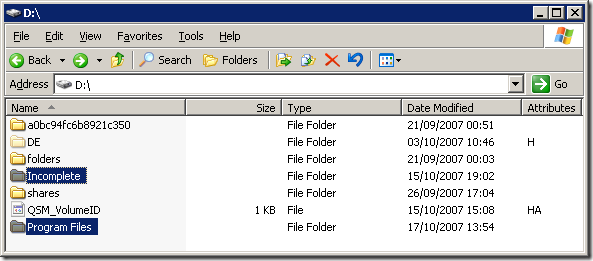
As you can see from the above image, apart from the Program Files folder on the C: drive, I have created an additional one in the root of the D: drive. Also present is an Incomplete folder for torrent files that are in the process of being downloaded.
Share this WHS Article with Others:




Hi,
I’d be very grateful if you could clarify the issue of running programs on WHS.
I wish to install some XP-compatible software on WHS which users can access either from within the home network or remotely. I also wish to stop remote users from being able to get past the server to look at the other computers. for security reasons.
Regarding the software, using it in this mode means that I won’t have to install it on all the computers, although I accept that it will only support one user concurrently.
Is this possible in WHS please?
Thanks,
Bill