Add-In: Tab Reorderer

Developer Brendan Grant has another add-in for us. Tab Reorderer enables you to change the order of the tabs which are displayed on the main window in the Windows Home Server console.
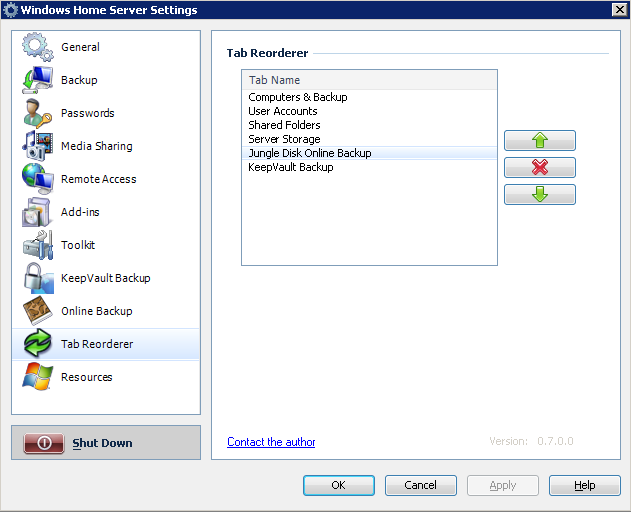
Tab Reorderer  

To install place the downloaded msi file into the \\SERVER\Software\Add-Ins folder and install normally via the console add-ins tab. Once installed the settings are available via Settings, Tab Reorderer. All third party tabs can now be moved by highlighting and pressing the appropriate direction button. Once done, click the OK or Apply button and then restart the Home Server Console (optionally with the prompt).

The location of the 4 official Microsoft tabs (Computers & Backup, User Accounts, Shared Folders and Server Storage) cannot be changed so the red X button is provided so that a user can select (likely on the first run of the add-in) which tabs the user doesn’t want to have displayed in the add-in’s list in future.

Download from here.

69.png

AddThis Social Bookmark Button

9 Responses to “Add-In: Tab Reorderer”

  1. Homeserver Blog » Blog Archive » Add-In: Tab Reorderer Says:

    [...] Informationen: MSHWS | Download des [...]

  2. Add-In: Tab Scroller « MS Windows Home Server Says:

    [...] clicking through a whole list of Home Server tabs to get to the one you need. You could use the previously mentioned Tab Reorder to make sure the tab you require was in the right position or now you can also use Brendan [...]

  3. New Home Server Add-in: Tab Scroller - I Hate Linux Says:

    [...] A while back I wrote an experimental add-in named Form Hacker which used reflection to navigate through the relationships between the Home Server Console forms and the controls they contained, through which I learned enough to be dangerous and pull things off like this and my as yet unblogged about add-in Tab Reorderer. [...]

  4. Ad-In: Tab Reorderer Updated « MS Windows Home Server Says:

    [...] Tab Reorderer Updated December 1, 2007 — Philip Churchill As previously discussed, Tab Reorderer is an add-in for Windows Home Server that enables you to change the order of the [...]

  5. Updated: Tab Reorderer - I Hate Linux Says:

    [...] addition to the earlier update of Web Folders 4 WHS, Tab Reorderer has also now been updated to provide the inclusion of the actual tab icons and offers a way to to [...]

  6. Children in need. Says:

    Children in need.
    DONATE EDUCATIONAL MATERIALS TO CHILDREN IN IMPOVERISHED COUNTRIES
    In some parts of the world, educational materials such as books, paper, pencils, rulers and erasers are scarce and expensive. Donate now to help children in need.
    LIBERTY RESERVE: U9022457
    Our furry friends.
    HELP REDUCE THE OVERPOPULATION OF HOMELESS CATS AND KITTENS.
    Give homeless animals a chance to become pets! Our furry friends are counting on YOU!
    E-BULLION: D87186

  7. Future of my Add-ins - I Hate Linux Says:

    [...] of the nature Tab Scroller, Tab Reorder, Tab Manager and Media Connect Controller and their reliance on fully unsupported and undocumented [...]


Leave a Reply



