By Philip Churchill on January 22nd, 2008
Add-In: Advanced Admin Console
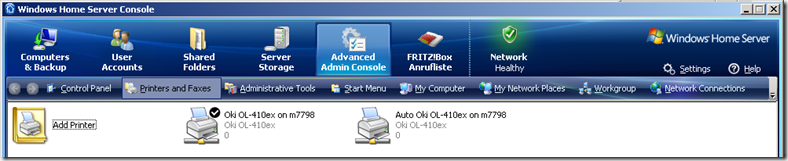
This is an add-In intended for advanced users that allows you to administer and have full control over your Home Server at any time. It allows to jump to the following areas of your Home Server within the Home Server Console:
- Control Panel
- Printers and Faxes
- Administrative Tools
- Start Menu
- “My Computer” (Which really should be called “My Server” on Windows Server SKUs)
- My Network Places
- Workgroup
- Network Connections
You can also launch a Command Prompt, PowerShell (if installed), Task Manager and Registry Editor from the add-in menu as well. Thus, it is unnecessary for the majority of administrative tasks to connect to your Home Server via Remote Desktop.
More info and the download are available from Andreas’ Space.
Share this WHS Article with Others:




This looks pretty cool. Phillip, the owner should post this on the WHS forum. I don’t see it there yet…..
Awesome add-in… one of my favorites produced so far due to the amount of use it gets. Great work Andreas!